Custom Navbar Module

Take control of your Phoenix Cart navigation with the Custom Navbar Module. Choose exactly which categories appear, add your own custom links and arrange everything in the order you want — creating a cleaner, more professional menu that helps customers find what matters faster.

Don’t leave your customers struggling with your navigation — upgrade your Phoenix Cart menu today and start making it easier for shoppers to find, click and buy!

Price: £15.00


CE Phoenix Cart Addon

Custom Navbar Module

Create a cleaner, more focused storefront navigation menu by choosing exactly which product categories and custom links appear in your CE Phoenix Cart navbar.

The Custom Navbar Module gives Phoenix Cart store owners greater control over the links displayed in the storefront navigation bar. Instead of automatically showing every category, you can select only the categories you want customers to see and combine them with manually created links to important pages, services, promotions or external websites.

Complete Navigation Control

Build a navigation menu that matches your store structure and guides customers towards the pages that matter most.

01

Select Individual Categories

Choose the exact store categories that should appear in the navbar instead of automatically displaying every available category.

02

Add Custom Links

Add links to pages such as Contact Us, About Us, Blog, Latest Addons, Special Offers, Hosting or any other internal or external destination.

03

Control Link Order

Assign custom sort values to category and manual links so they appear in precisely the order required.

04

Mix Categories and Pages

Place manual links before categories, after categories or mix everything together using a shared sort order.

05

Multilingual Category Names

Category names are automatically displayed using the language currently selected by the customer.

06

Responsive Storefront Design

Navigation links are presented clearly across desktop computers, tablets and mobile devices.

Main Features

  • Select individual store categories
  • Support for parent and nested categories
  • Language-aware category names
  • Automatic category path generation
  • Compatibility with Phoenix Cart Linker URLs
  • Add multiple manual navigation links
  • Support for internal and external URLs
  • Optional new-window links
  • Custom category sort orders
  • Custom manual-link sort orders
  • Responsive desktop and mobile layout
  • Standard Phoenix Cart module controls

Suitable Link Types

  • Phoenix Cart pages
  • SEO-friendly store URLs
  • Product or category landing pages
  • Promotional campaign pages
  • External websites
  • Anchor links
  • Customer service pages

Flexible Link Positioning

Select the arrangement that best suits your storefront navigation.

1

Manual Links Before Categories

Display custom page links first, followed by the selected store categories.

2

Manual Links After Categories

Display the selected product categories first, followed by your custom links.

3

Mixed by Sort Order

Combine categories and manual links into a single menu arranged by their individual sort values.

Manual Link Format

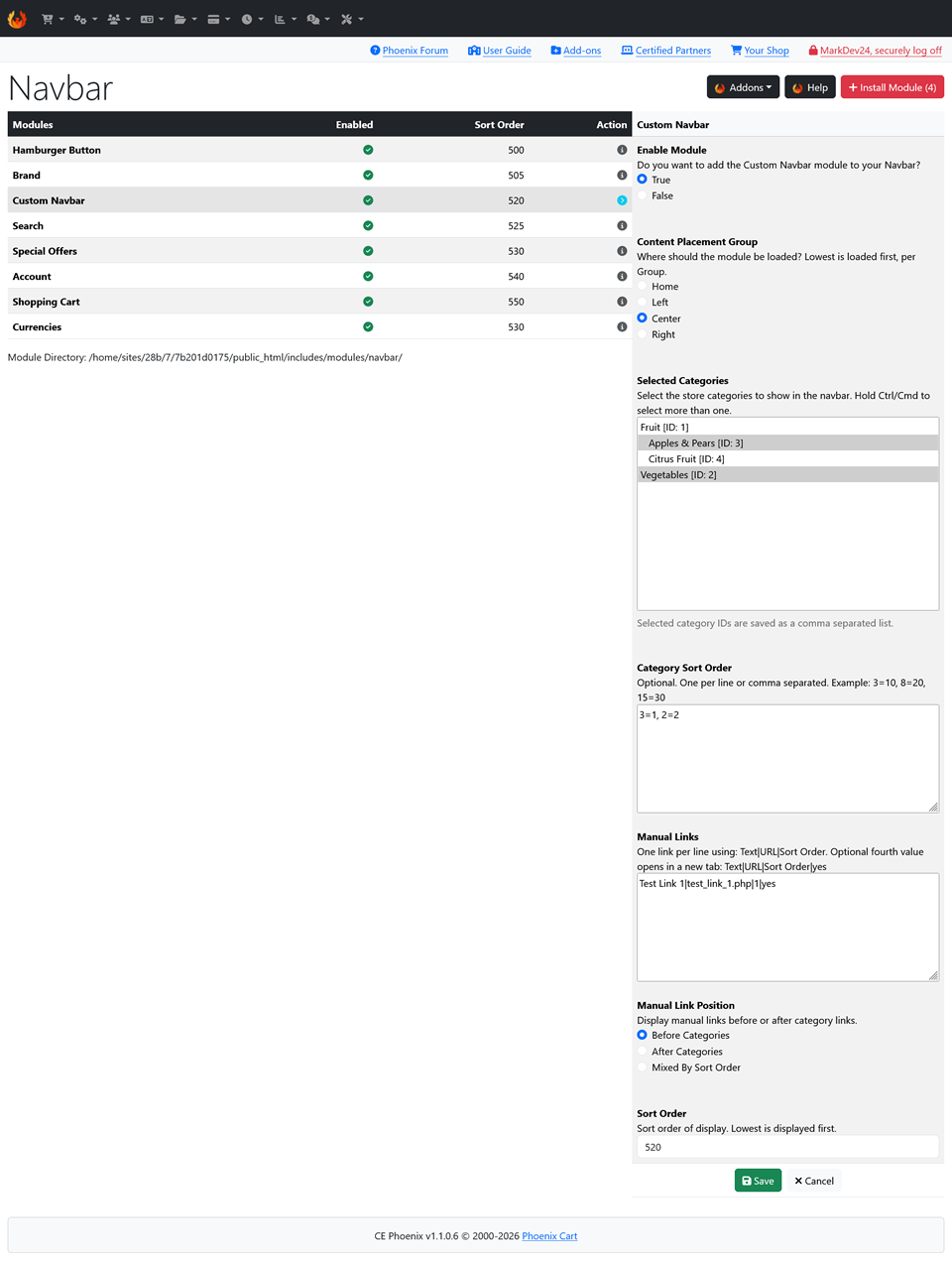
Manual links can be entered one per line using a simple pipe-separated format:

Link Text|URL|Sort Order

Example internal store link:

Contact Us|contact_us.php|40

To open an external link in a new browser tab, add a fourth value:

BusyBee Commerce|https://www.busybeecommerce.co.uk|50|yes

Category Sort Order

Selected categories can be given individual sort values using their category IDs. This allows important categories to appear first, regardless of their normal storefront order.

3=10, 8=20, 15=30

Categories without an assigned value are automatically given a sensible default sort position.

Simple Phoenix Cart Management

The module is installed and configured through the standard Phoenix Cart Navbar Modules area. It can be enabled, disabled, positioned and sorted using the normal module controls, without requiring a separate administration page or changes to Phoenix Cart core files.

A Cleaner Storefront Navigation Experience

The Custom Navbar Module is ideal for Phoenix Cart stores that need a more organised and customer-friendly menu. By removing unnecessary category links and highlighting important pages, the module helps customers find products and information more quickly while giving the storefront a cleaner, more professional appearance.

0 item(s), £0.00

0 items